Quick answer
To run Facebook ads for real estate, connect a business Facebook Page, select the Leads or Traffic objective in Meta Ads Manager, declare the Housing Special Ad Category, choose an eligible location area, create an accurate property or seller offer, connect an Instant Form or matching page, set the budget, and plan lead follow-up before publishing. U.S. Housing campaigns cannot use ZIP-code, age, gender, exclusion, or Lookalike Audience targeting; location targeting uses a 15-mile minimum radius.
Motivated Seller
A motivated seller campaign gives homeowners a specific reason to start a conversation with a real estate agent. The offer can be a home-value review, seller-options guide, as-is sale consultation, inherited-property resource, downsizing plan, or local market analysis. The ad should describe the service and property situation without implying that Meta identified someone by financial status, age, family status, or another sensitive trait.
Use the Leads objective in Meta Ads Manager, choose Instant Forms, declare the Housing Special Ad Category, and ask only for the contact details and property information needed for a useful first call. Follow up by asking what the owner wants to accomplish and when—not by assuming distress.

Lead Generation
Real estate lead generation on Facebook and Instagram connects an ad to a Meta Instant Form or a matching real estate landing page. Instant Forms reduce friction because the prospect stays inside Meta; a website can provide more context and qualification. In either path, the ad offer, form headline, questions, privacy policy, and thank-you screen should describe the same next step.
Measure more than Meta's reported lead count. Track contact rate, qualified conversations, appointments, signed clients, media spend, and cost per appointment. Decide who receives each lead in the customer relationship management system before the campaign launches, then call and text promptly with the context of the exact ad and offer.
Seller Leads
Seller leads are homeowners who respond to a property-value, seller-options, market-update, recently sold, downsizing, or move-timing offer. They are not necessarily ready to list. A useful seller campaign earns permission for an agent to discuss the property, timing, and decision rather than promising an instant listing appointment.
Make the offer local and concrete: explain what the homeowner receives, identify the city or service area, and show a real property or recognizable market context. Ask for name, email, phone, property address, and an optional timing question only when each field changes the follow-up. Route valuation requests to a seller-specific sequence instead of a generic buyer drip.
Meta Ad Examples
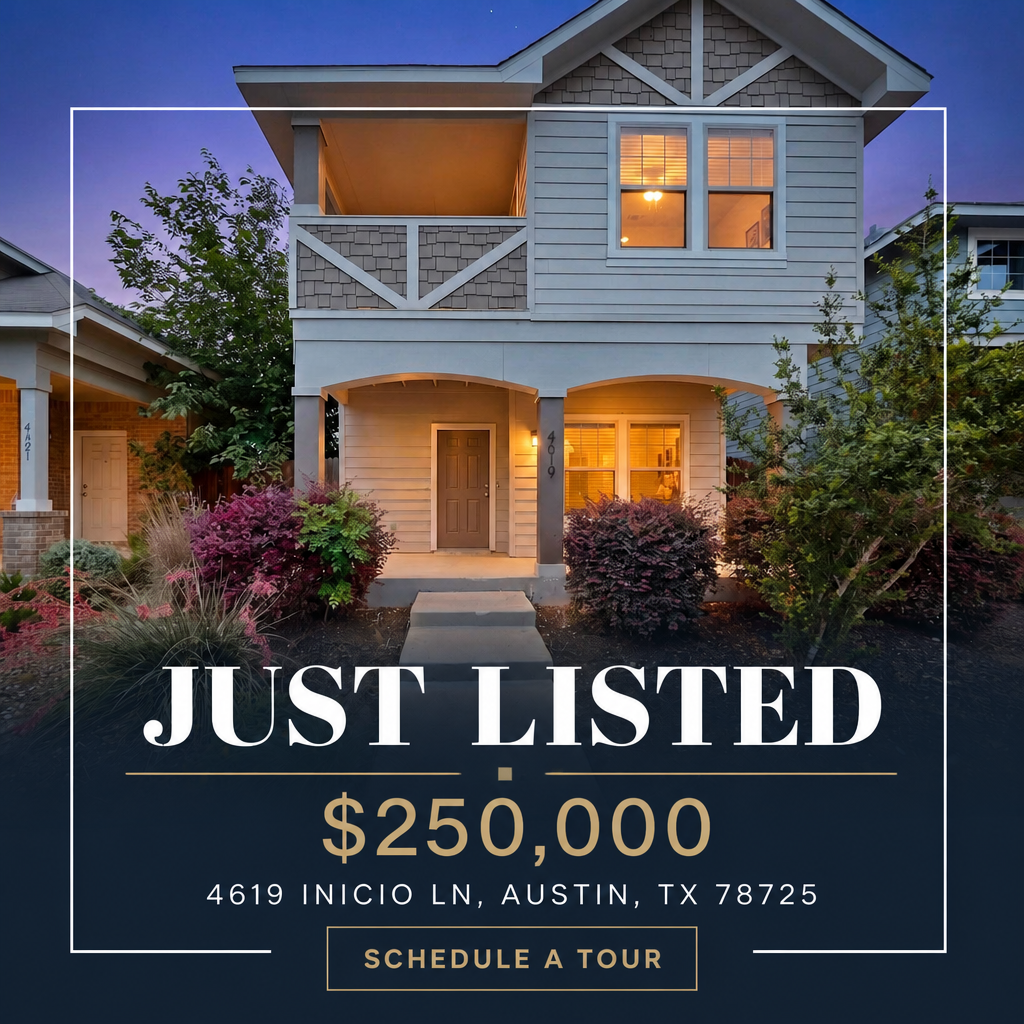
Useful Meta ad examples show the complete relationship between creative, primary text, headline, call to action, destination, and follow-up. For real estate, common formats include just listed, coming soon, open house, price improved, home valuation, new construction, seller options, and relocation campaigns across Facebook Feed, Instagram Feed, Stories, and Reels.
Treat every example as a structure to adapt, not a result claim. Replace the property image, market name, offer, disclosures, and destination with accurate information. Preview each placement in Meta Ads Manager, confirm the mobile crop, and never reuse performance figures unless they come from a documented campaign.
Browse the annotated real estate Facebook ad examples and real estate ad template library for more structures.

For Sale
A for-sale campaign promotes a specific active listing with accurate property details, real photos, a clear status, and a destination where the listing can be reviewed. It can support listing exposure, showing requests, open-house registrations, and seller-side proof that the property is being marketed across Facebook and Instagram.
Lead with the strongest verifiable property detail, name the city or neighborhood, and keep the price and availability current. Send the ad to the matching listing page or Instant Form, declare Housing, use an eligible location area with Meta's 15-mile minimum radius, and pause the campaign promptly when the listing status changes.
Before you start
- Admin access to a business Facebook Page
- A listing URL or listing details, or the offer you want to promote
- A payment method for media spend (billed by Meta)
- A plan for who calls the leads and how fast
Step 1: Connect your Facebook Page and ad account
Nothing runs until a Facebook Page is connected. The Page is the identity your ad appears under, so use your business Page rather than a personal profile, and make sure you have admin access to it before you start.
Open Meta Business Suite, create or select a Business portfolio, add your Page and create an ad account under Business settings. Add a payment method to the ad account.
Connect your Facebook Page during onboarding. Walled Garden provides the ad-account infrastructure, so you do not create or manage a Business Manager ad account yourself.
Step 2: Declare the Housing Special Ad Category
Any ad promoting housing must be declared under Meta's Housing Special Ad Category. Declaring it changes which targeting controls are available, so do it before you build the audience rather than after.
At campaign level, switch on 'Special Ad Categories' and choose Housing, then confirm the country. Ads Manager will then hide the restricted targeting options.
Walled Garden applies Meta's Housing Special Ad Category to every real estate campaign it launches, so the declaration is not something you can forget. Fair-housing rules still govern your copy and imagery. This is general information, not legal advice.
Step 3: Choose your campaign objective
Lead generation with an instant form is the default for buyer, seller and open-house offers. Traffic is the right choice when you want people to reach a full listing page. Pick one objective per campaign.
At campaign creation, select 'Leads' and choose Instant forms as the conversion location, or select 'Traffic' and set the website as the destination.
Pick the campaign type when you start a campaign — listing, open house, buyer or seller — and the matching objective and destination are set for you.
Not sure which objective fits your goal? The decision guide has an objective-to-offer table. See the objective table.
Step 4: Set location and audience
Housing campaigns run on location plus your own data. Build the audience from what is still available rather than trying to recreate old interest targeting.
Set a location radius of at least 15 miles — the Housing minimum. Upload a customer list or use website/engagement audiences to create Custom Audiences. Leave detailed targeting broad, or use Advantage+ audience.
Choose the market area, upload a contact list, or retarget your website traffic. The 15-mile minimum is enforced for you and the audience is built inside the Housing rules.
Lookalike Audiences are unavailable in the Housing category. Meta's earlier substitute, Special Ad Audiences, was discontinued in 2022. Use Custom Audiences from your own first-party data, location targeting with the 15-mile minimum radius, and broad delivery. Meta's Variance Reduction System also applies to U.S. housing ads. Housing category reference.
Step 5: Create the ad
One image or short video, one headline, one call to action. Name the neighborhood or city in the first line so the right people stop scrolling, and keep the promise in the ad identical to the promise on the form.
At the ad level, upload your creative, write the primary text, headline and description, and set the call-to-action button. Preview the placement on mobile before saving.
Start from a real estate template or paste a listing URL, then edit the generated copy and swap images in Creative Studio.
Copy rules: describe the property, never the person you want to reach. Avoid language about family status, religion, national origin, disability or any other protected class, and avoid phrases that imply who should or should not apply. Ad templates · 22 ad examples · Creative Studio.
Step 6: Build the instant form
Ask for the fewest fields that still let you follow up: name, email, phone. Every extra question lowers volume, so add one only when the answer changes what you do next.
In the ad, create an Instant form, choose 'More volume' or 'Higher intent', add your questions, link your privacy policy and write the thank-you screen.
The lead form is built into the campaign type with the standard fields pre-set; add qualifying questions if you want them, and set where the notification goes.
Step 7: Set budget and schedule
Choose a steady daily budget you can hold for two to four weeks. Editing a live campaign restarts Meta's learning, so pick a number you will not touch mid-test.
At the ad-set level, set a daily or lifetime budget and a start date. Leave the end date open for ongoing campaigns, or set one for a dated event like an open house.
Set the daily budget and run dates on the campaign screen. Media spend is billed by Meta to the card on the account that runs the campaign.
For budget ranges and cost planning, see the cost and budget guides linked below. Cost guide · Budget guide.
Step 8: Review and launch
Before publishing, check four things: the Housing declaration is on, the radius is at least 15 miles, the form fields and privacy link work, and the destination matches the offer.
Click Publish. Meta reviews the ad — most reviews complete within a day. Watch for a rejection notice and edit rather than resubmit the same ad.
Launch from the review screen. The campaign is submitted to Meta with the Housing category declared and the campaign fee charged at launch.
Step 9: Route and follow up on leads
Decide who calls before the first lead lands. Follow-up speed does more for your results than any targeting change you can make after launch.
Download leads from the Page's Lead Center, or connect a CRM integration so submissions forward automatically.
Leads arrive in your leads list with an email or SMS notification. Export leads as CSV; CRM connections are listed on the pricing page when available.
Step 10: Read the results and iterate
Leave the campaign alone for the first week, then change one thing at a time. Read the seven-day trend rather than a single day, and fix the number that is actually broken.
In Ads Manager, add columns for results, cost per result, CTR and frequency. Compare ads within the same ad set before comparing campaigns.
The campaign dashboard shows leads, cost per lead, spend and click-through rate in one view, and you can duplicate a winning campaign to a new listing.
Troubleshooting a campaign that is not working
Read the seven-day trend across leads, cost per lead, spend, click-through rate, appointments, and qualified conversations. Diagnose the stage that is underperforming before changing the campaign.
Under 1 percent usually means the creative is not stopping the scroll. Change the image first, the headline second.
The form or destination is the problem. Cut fields, load faster on mobile, and make the offer match the ad exactly.
Often creative fatigue. If frequency is above roughly 3, refresh the creative before raising the budget.
Not an ad problem. Call the same day and follow with a text, then an email.
About the Authors

Toni Thom
Co-Founder & Chief Operating Officer
Real estate operations executive with 10+ years of experience empowering agents through user-friendly technology and exceptional customer success.
Launch your first campaign
Start from a real estate template, review the creative and budget, and launch with the Housing Special Ad Category already declared. Compare real estate ad tools.
10-day free trial, no credit card required. No contracts, cancel anytime.